

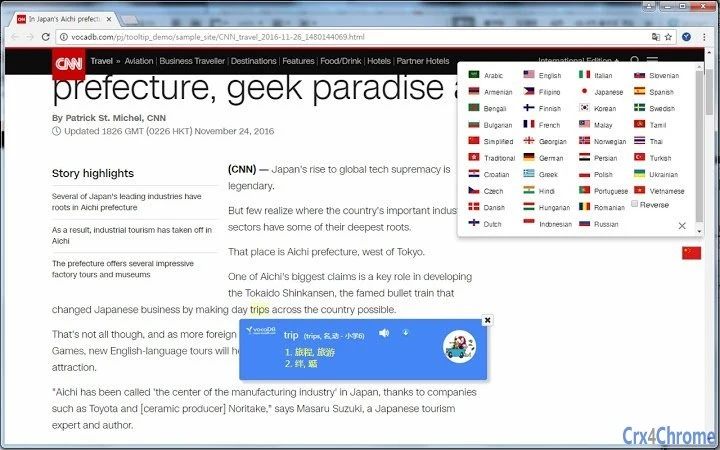
Description
Instant Word Translation Tool
Overview
The VocaDB Tooltip software is designed to streamline language learning by enabling users to instantly access translations and definitions through a simple text selection process. Instead of manually typing words into a dictionary or translation service, users can highlight any word or phrase on their screen and receive immediate results. This functionality is particularly beneficial for students, language learners, and professionals who frequently encounter foreign text in documents, web pages, or digital content.
By leveraging VocaDB’s proprietary extraction technology and integrating with Google Translate and MS Bing APIs, the tool delivers multilingual support across 38 languages. This makes it a versatile utility for individuals working with diverse linguistic content. The software operates as a desktop application, providing consistent access regardless of browser or platform usage.
Real-world scenarios include translating technical terms in research papers, understanding foreign language subtitles during video viewing, or expanding vocabulary while reading foreign-language books or articles. The developer, VocaDB, has previously released related tools such as browser extensions and mobile apps, indicating a focus on cross-platform language assistance.
Key Features & Capabilities
- One-Click Word Extraction – Highlight any word or phrase in any application, and the tool instantly retrieves its definition and translation.
- 38-Language Support – Offers translations across a broad range of languages, making it suitable for multilingual users and international communication.
- Integrated Translation APIs – Powered by VocaDB’s Extraction API, along with Google Translate and MS Bing, ensuring reliable and accurate results.
- Seamless Desktop Integration – Functions independently of web browsers, providing consistent performance across all desktop applications.
- Real-Time Definition Display – Translated definitions appear immediately in a non-intrusive tooltip window, preserving workflow continuity.
For example, a student reading a German academic article can highlight an unfamiliar term, and the tool will display the English translation and definition without switching contexts. Similarly, a professional reviewing a client document in Japanese can quickly understand key phrases without external tools. The integration with established translation services enhances trust and accuracy, while the desktop nature ensures no dependency on internet-connected browsers.
User Interface, Workflow & Performance
The user interface is minimalistic and designed for efficiency. The tooltip appears seamlessly upon text selection, displaying the translation and definition in a clean, readable format. Navigation is intuitive—users do not need to open a separate window or perform complex actions to access results.
Workflow efficiency is high, as the tool eliminates the need to copy-paste text into external services. The process is instantaneous, allowing users to maintain focus on their primary task. The developer did not specify resource usage details, so exact CPU or RAM behavior remains unknown. However, based on similar tools, it is expected to operate with low system impact.
Stability appears to be a priority, given the tool’s reliance on robust APIs and its consistent functionality across platforms. The software is designed to run in the background without interfering with other applications. No reported issues with crashes or freezes were mentioned in the provided data.
Compatibility & System Requirements
The software is compatible with both Windows and Mac operating systems, supporting desktop environments for broad accessibility. It is available in version 1.0.0 and has a file size of 15.2 MB, indicating a lightweight installation.
Exact system requirements were not listed. The developer did not provide additional system requirements, so users should ensure their systems meet general desktop application standards. Platform compatibility information is limited to the two major operating systems, with no mention of Linux or other platforms.
Pros and Cons
Pros
- Instant translation via text selection—no manual input required
- Supports 38 languages through trusted APIs
- Lightweight installation at 15.2 MB
- Runs independently of web browsers
- Free to use with no hidden costs
Cons
- Exact performance and system requirements not disclosed
- Limited to Windows and Mac platforms
- No information on offline functionality
- Dependent on third-party APIs for translation accuracy
FAQ Section
Is VocaDB Tooltip available for Windows and Mac?
Yes, the software is compatible with both Windows and Mac operating systems.
Can I use this tool without an internet connection?
It is not confirmed whether the tool supports offline usage. The software relies on external APIs for translation, which typically require an active internet connection.
Is the software free to download and use?
Yes, the software is available at no cost. There are no subscription fees or in-app purchases.
How often are updates released?
Specific update frequency was not provided. Users should check the official website for the latest version.
What kind of license does the software have?
The licensing model was not specified. However, since the software is free, it likely uses a standard free-to-use license.
Final Thoughts
VocaDB Tooltip stands out as a practical, no-frills tool for anyone engaged in language learning or multilingual content consumption. Its core strength lies in eliminating the friction of manual dictionary searches through intelligent text extraction and instant translation. The support for 38 languages and integration with major translation services enhance its reliability and versatility.
While system requirements and offline capabilities remain unclear, the tool’s lightweight size and desktop-first design make it a strong candidate for daily use. It is especially suited for students, researchers, translators, and language enthusiasts who value speed and simplicity.
With a clean interface, efficient workflow, and zero cost, VocaDB Tooltip delivers real value. Download the latest version today.
Guides & Tutorials for 38-Language Tooltip Dictionary Extension for Chrome
How to install 38-Language Tooltip Dictionary Extension for Chrome
- Click the Preview / Download button above.
- Once redirected, accept the terms and click Install.
- Wait for the 38-Language Tooltip Dictionary Extension for Chrome download to finish on your device.
How to use 38-Language Tooltip Dictionary Extension for Chrome
This software is primarily used for its core features described above. Open the app after installation to explore its capabilities.
User Reviews for 38-Language Tooltip Dictionary Extension for Chrome 0
No reviews found





